
Have 3gs, only want to sync selected contacts from outlook 2003, certain categorized contacts, not all contacts

You will have to move those certain categorized contacts to a new contacts folder in OutlookI. So i outlook create another contacts folder go to the folder tab and right click and select new folder - name it what every you like eg." iPhone Contacts" Copy or move all the contacts you have in outlook that you what to sync with your iphone to that new folder.
In itunes make sure your iphone is connected and then select your device on the left hand panel then select the the info tab at the top make sure sync contacts with: Outlook is selected and then choose Selected groups and tick the new folder you just created in outlook.
Just below that also tick Put new contacts created on this iPhone into group: and the select the group that you want to go in - most likely you will want it to go into the same one (folder)

1. Open Outlook on your computer and make sure it is the latest version.
2. Click on "File" at top left corner and a dialogue pops out. Choose "Open & Export > Import/Export".
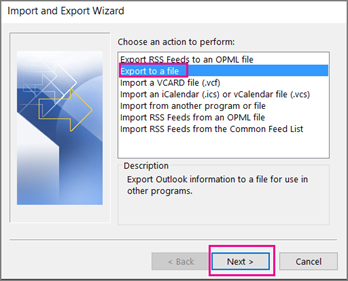
3.Now select the option of "Export to a file" in the option list, then click "Next" and "Comma Separated Values".
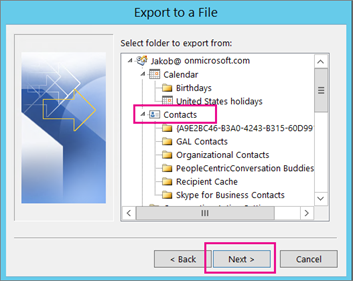
4. Under the box "Select folder to export from", click on "Contacts" and continue by tapping on "Next".
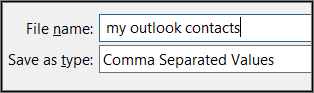
5. Choose "Browse" and input your file name, then click "OK".
6. Choose the target output directory now and click on "Next". After a while, your computer has Outlook contacts. You can open the file to check if it is OK.
For more details: https://www.leawo.org/tutorial/how-to-export-outlook-contacts-to-icloud-1361.html?=1400
Sorry...doesn't work for me.
I did as you told but when i try selecting the folder in iTunes, it just doesnt show up in the 'selected folders' option.
Any ideas?
1,240 views
Usually answered in minutes!


×